Introduction
Somewhere between “I want to add AI to my product” and “I have a working chatbot in production,” most teams get stuck choosing infrastructure: do you train your own model, rent GPU clusters, or just call an API and move on? Amazon Bedrock exists precisely to remove that middle step. It hands you access to foundation models from providers like Anthropic, Meta, and Mistral through a single managed service, without asking you to provision a single server. This piece walks through exactly how to go from an empty AWS account to a working generative AI application, along with the decisions that actually matter along the way.
Why Bedrock Changes the Math for Smaller Teams
Before Bedrock, building anything with large language models meant either paying for a third-party API with limited customization or standing up your own inference infrastructure a genuinely painful path involving GPU provisioning, model hosting, and scaling headaches most five-person startups have no business dealing with. Bedrock sits in between those two extremes. It’s serverless by design, meaning you pay per token processed rather than for idle compute, and it gives you access to multiple foundation model families without locking you into a single vendor’s roadmap.
This matters more than it sounds. A team building a customer support assistant might start with one model, realize a competitor’s model handles multi-turn conversations more naturally, and switch providers within the same Bedrock console, no re-architecture required. That kind of flexibility used to take months of engineering work; now it’s closer to changing a configuration value.
Getting Your AWS Account Ready for Model Access
The first practical step isn’t touching a model at all; it’s requesting access. Bedrock requires you to explicitly enable each foundation model family you plan to use through the console, a step Amazon added deliberately to keep usage intentional and auditable. Once access is granted, you’ll set up an IAM role scoped specifically to Bedrock actions, following the same least-privilege principle that governs every other AWS service. Skipping this step and using an overly broad role is a common rookie mistake that shows up badly in security reviews later.
From there, the actual entry point is either the Bedrock console for quick experimentation or the AWS SDK boto3 for Python teams for anything you intend to ship. Most serious builds start in the console to test prompts and compare model outputs, then move to code once the behavior feels right.
Choosing the Right Foundation Model for Your Use Case
This is where most of the real decision-making happens, and it’s tempting to just default to whichever model is trending. Resist that. A customer-facing chatbot answering product questions has very different requirements than an internal tool summarizing legal contracts. The former needs fast response times and conversational tone; the latter needs long context windows and precision over speed.
Bedrock’s model catalog spans several families, each with distinct strengths. Some excel at long-document reasoning, others at code generation, and others at multilingual support a genuinely useful trait if your application serves users across different regions. The practical approach is to run the same three or four test prompts across two or three candidate models inside the console’s comparison view before committing to one in your application logic. This five-minute test regularly saves teams from a costly mid-project model swap.
Generative AI Application Using Amazon Bedrock
Designing the Application Layer Around Bedrock
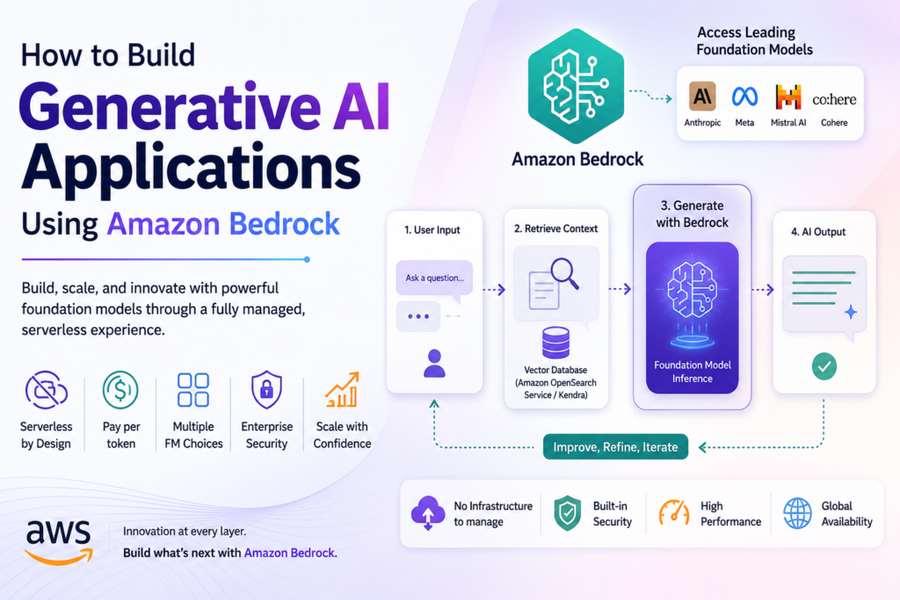
Once a model is selected, the application itself typically follows a familiar pattern: a frontend or API layer captures user input, a backend service constructs a prompt (often enriched with retrieved context), and Bedrock returns the generated response. Where this gets interesting is the middle step, prompt construction, because raw user input rarely produces the best results on its own.
For anything beyond a simple demo, you’ll want to implement retrieval-augmented generation, commonly shortened to RAG. This means storing your own documents product manuals, internal policies, past support tickets in a vector database, then retrieving the most relevant chunks at query time and feeding them into the model alongside the user’s question. Bedrock integrates natively with Amazon OpenSearch Service and Amazon Kendra for this purpose, which saves you from wiring up a separate vector database from scratch. A retail company building a product-recommendation assistant, for instance, might index its entire catalog this way, letting the model answer specific questions about stock, sizing, or compatibility instead of hallucinating generic responses.
A Practical Use Case Walkthrough
Consider a mid-sized insurance company trying to reduce the time agents spend searching policy documents during customer calls. Using Bedrock, they built an internal assistant that ingests policy PDFs into a knowledge base, embeds them using Bedrock’s built-in embedding models, and lets agents ask natural-language questions like “does this plan cover pre-existing conditions in year one?” The application layer sits behind their existing internal portal, calling Bedrock’s API with the retrieved context attached to each query. The result: agents get answers in seconds instead of scrolling through forty-page documents mid-call.
This same pattern ingest, embed, retrieve, generate repeats across industries with minor variations. A law firm swaps policy documents for case law. A software company swaps them for API documentation. The architecture barely changes; only the source data does.
Bedrock Versus Sage Maker: Picking the Right Tool
| Aspect | Amazon Bedrock | Amazon SageMaker |
| Setup Complexity | Minimal, fully managed, serverless | Higher requires infrastructure management |
| Model Access | Pre-trained foundation models via API | Train, fine-tune, or host custom models |
| Best For | Fast deployment, standard use cases | Custom model training, deep customization |
| Pricing Model | Pay-per-token usage | Pay for compute instances and storage |
| Ideal Team Size | Small to mid-sized teams, fast iteration | Teams with ML engineering expertise |
Generative AI Application Using Amazon Bedrock
Cost Control and Monitoring Once You’re Live
Token-based pricing sounds simple until your application scales and a support ticket floods you with thousands of near-identical queries in an hour. Bedrock integrates with Amazon CloudWatch for usage monitoring, and setting up budget alerts here isn’t optional; it’s the difference between catching a runaway prompt loop early and discovering it on next month’s bill. A practical habit worth building early: cap max token output per request, and log every prompt-response pair during the first few weeks of production to catch unexpected patterns before they become expensive ones.
Caching repeated queries, a common pattern for FAQ-style assistants, can also cut costs meaningfully, since there’s no reason to regenerate an identical answer to an identical question every single time.
Where Certification and Structured Learning Fit In
Building on Bedrock touches a surprising range of AWS services IAM, networking, storage, and increasingly, security governance which is exactly the breadth that a foundational or associate-level AWS credential is designed to teach. If you’re an architect or engineer newly responsible for AI infrastructure decisions, holding an AWS Solutions Architect certification gives you the vocabulary and design instincts to make sensible calls about where Bedrock fits inside a broader system, rather than treating it as an isolated black box.
For learners who prefer structured, hands-on guidance over piecing things together from documentation alone, several AWS courses in Chennai have started incorporating generative AI modules directly into their existing cloud training tracks, reflecting just how quickly this skill set has become part of mainstream cloud engineering rather than a specialized niche. The AWS certification benefits here go beyond the badge itself: a certified professional walking into a Bedrock project already understands IAM roles, service quotas, and cost governance, which cuts the ramp-up time considerably compared to learning all of it while the project is already live.
Common Pitfalls Worth Avoiding Early
Teams new to Bedrock tend to make the same handful of mistakes. They over-engineer the prompt before testing with real users, they skip setting up evaluation metrics until something goes visibly wrong, and they underestimate how much retrieval quality, not model choice, determines the final output’s accuracy. A model can only be as good as the context it’s given; garbage retrieval produces garbage answers regardless of which foundation model sits behind the API call. Spending extra time refining your chunking strategy and retrieval relevance almost always pays off more than switching to a “better” model.
Bringing It All Together
Building on Amazon Bedrock isn’t really about mastering a single tool; it’s about understanding how a managed AI service fits into the broader architecture decisions you’re already making around identity, storage, and cost. Start small: pick one narrow use case, test a couple of models against real prompts, wire up retrieval if your data demands it, and monitor costs from day one rather than after the first surprising bill. Do that, and you’ll have a working generative AI application long before your competitors finish debating which model to fine-tune.
FAQ
- What is Amazon Bedrock used for? Amazon Bedrock is a fully managed service that gives developers API access to multiple foundation models from providers like Anthropic and Meta, allowing them to build generative AI applications without managing underlying infrastructure.
- Do I need machine learning expertise to use Amazon Bedrock? No Bedrock is designed for application developers who want to integrate pre-trained models via API calls, so deep machine learning knowledge isn’t required for most standard use cases.
- How is Amazon Bedrock different from Amazon SageMaker? Bedrock offers quick, serverless access to pre-trained foundation models, while SageMaker is built for teams that need to train, fine-tune, or fully customize their own machine learning models.
- Is Amazon Bedrock expensive for small projects? Bedrock uses pay-per-token pricing, which generally makes it cost-effective for small to moderate usage, though costs can scale quickly without proper monitoring and caching strategies.
- Can Amazon Bedrock be used to build a chatbot with company-specific knowledge? Yes, by implementing retrieval-augmented generation with services like Amazon OpenSearch or Amazon Kendra, Bedrock can generate responses grounded in a company’s own documents and data.
- Which AWS certification helps most with generative AI projects on Bedrock? An associate or professional-level architecture certification builds the foundational cloud design skills needed to integrate Bedrock securely and cost-effectively within a larger system.
- What is the biggest factor in getting accurate responses from Bedrock? Retrieval quality typically matters more than model choice. Well-organized, relevant context fed into the prompt produces significantly better results than switching between foundation models.
- Is prior AWS experience necessary before learning Amazon Bedrock? Basic familiarity with core AWS services like IAM and storage helps significantly, and many learners strengthen this foundation through structured cloud training before diving into generative AI-specific tools.
Written by
Santhosh Kumar
Expert instructor and certified professional with extensive experience training working professionals for global certifications including PMP, AWS, CSM, and PSM.